
The study buddy that asks the right questions.
Meet Iggy — a patient learning buddy that guides your child to the answer instead of handing it over, with a calm window into their progress for you.
Free to start · No credit card · Cancel anytime
An AI you’d actually let your kid talk to.
Because you shouldn’t have to wonder.
You’re in charge
Nothing starts until you approve it. Your child signs in with a 6-digit code — no email, no password, nothing anyone can steal. Change your mind and you can turn it off in one tap.
It won’t just give them the answer
Iggy asks questions and waits. It’ll explain the same thing five different ways and never once sigh. Your child does the thinking — that’s the whole point.
You’ll know how it’s going
Once a week, a short note: what clicked, what didn’t, where they’re stuck. And if anything ever worries us, we’ll tell you that day — not in next week’s summary.
Most AI gives answers. Ours gives your child the “aha.”
Same problem, two tutors. One hands over the answer. Iggy helps your child find it.
Answer-dumping AI
The work done is 39.2 J. W = F·d = (2 × 9.8) × 2. Just copy it down.
Answer copied. Nothing understood.
IQnition — Learns by asking
When it moves up at a steady speed, what force are we working against?
Gravity — so 2 × 9.8 = 19.6 N?
Exactly. Now multiply by the 2 m height — what do you get?
39.2 J!
She solved it herself — 39.2 J. It sticks.
Made for students. Loved by parents.
One study buddy for the whole family — with a view tuned to each of you.
Get unstuck — fast.
Turn confusing homework into clear, step-by-step understanding.
Walk into tests with confidence.
Practice smarter, review what matters, and know you’re ready.
Smarter study, better results.
Personalized study plans adapt to how you learn, not just what you study.
Your AI study partner — 24/7.
Help when you need it. Progress you can see.
Made for families, not advertisers.
No ads, no data selling, and privacy standards built for younger students — so you can hand it to your child with confidence.
COPPA-conscious
Privacy standards built for younger students from the ground up.
Parent-controlled
Child accounts join with a private 6-digit code you approve.
No ads, no selling
We don’t run ads or sell data. Full stop.
Age-appropriate
Content and pacing tuned to grades 3–12 and each child’s level.
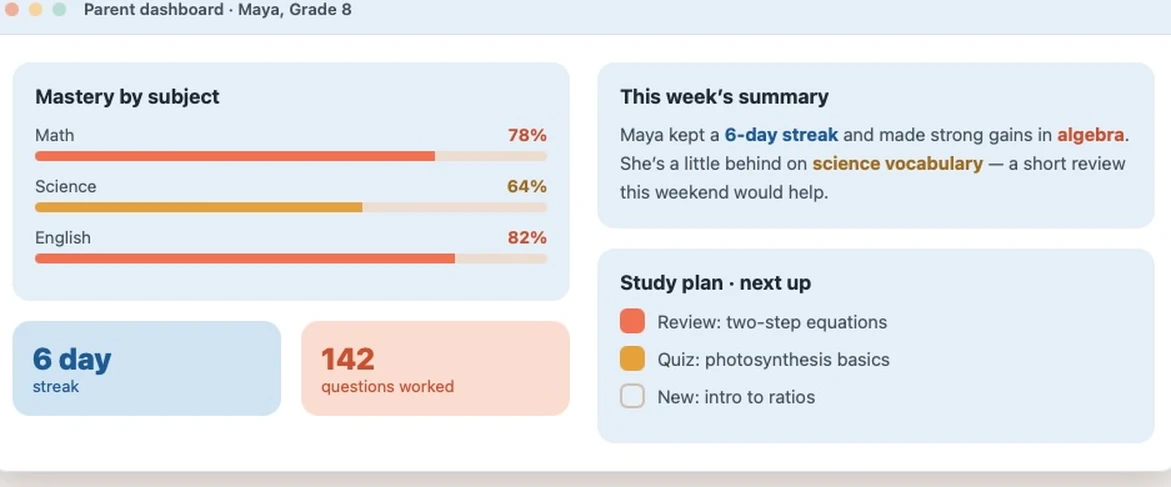
A calm weekly picture — never a surprise.
See mastery, streaks, and what’s next — at a glance, without hovering.
Mastery by subject
This week’s summary
Maya kept a 6-day streak and made strong gains in algebra. She’s a little behind on science vocabulary — a short review this weekend would help.
Study plan · next up
Simple, family-friendly pricing.
Free to try. All paid plans start with a 7-day free trial. Same price on iPhone, Android, and web.
Free
Try it before you buy it.
- ✓3 tutor sessions per day
- ✓5 practice quizzes per week
- ✓1 active study plan
- ✓1 learner seat
Family Lite
Perfect for most families.
- ✓Up to 2 learners
- ✓Unlimited tutor + solver
- ✓Full quiz library
- ✓Parent dashboard + progress reports
- ✓7-day free trial
Family Pro
For larger households.
- ✓Up to 5 learners
- ✓Everything in Family Lite
- ✓10 active plans per learner
- ✓Priority feature access
- ✓7-day free trial
Independent learner (13+)? A dedicated Student plan is on the full pricing page.
Questions parents ask
Does IQnition work on Apple devices (iPhone and iPad)?
Yes. IQnition works on iPhone and iPad. Open iqnition.ai in Safari on any newer Apple device, or download the app from the App Store when it launches. It runs on iOS/iPadOS 15+ — devices on older versions aren’t supported.
Does IQnition work on Android devices?
Yes. IQnition works on Android phones and tablets. Open iqnition.ai in Chrome, or get the app from Google Play when it launches. It runs on Android 8.0+ — devices below that aren’t supported.
Does IQnition work on tablets?
Yes — and the bigger screen is great for study sessions. That includes iPad (iPadOS 15+) and Android tablets (Android 8.0+), in the app or any modern browser. There’s no minimum screen size; the only cutoff is the OS version.
I’m in Canada — can I use IQnition?
Yes. You can use IQnition on the web today at iqnition.ai. Native iPhone and Android apps launch in the Canadian App Store and Google Play in early-to-mid September 2026. Prices are shown in CAD on all surfaces. One exception: we’re not in Québec just yet — French-language support for Québec is on the roadmap and we’ll open there as soon as it’s ready. Everywhere else in Canada is welcome. **Curriculum note:** we currently follow US/Common Core standards; provincial alignment (Ontario, BC, Alberta, and others) is on the roadmap.
Why do you ask what type of school my child attends?
So we can match your learner to the right standards and context. When you add a learner, you tell us their school type — public/charter, private, homeschool, religious (Catholic, Christian, Jewish, Islamic), or independent — and we tailor how the tutor references curriculum and expectations to fit. You can change it anytime from the learner’s profile.
Why do you ask for my child’s syllabus?
It’s optional, but it makes their study plan much sharper. Snap a photo or upload a PDF of the class syllabus and tag it to the course; IQnition reads the topics, sequence, and key dates, shows you what it found, and asks you to confirm before anything is used. From there, study plans are anchored to that syllabus — the right topics, in the order the class teaches them, timed to what’s coming next — with a marker showing which parts came from the syllabus. Without one, we still build a strong plan from your child’s grade, subject, and state standards. You can add, update, or remove a syllabus anytime, or turn syllabus-based planning off.
Does IQnition follow my state’s standards?
For US public and charter learners, IQnition aligns to your state’s standards. Most states default to Common Core. Three states use their own, and we follow those directly: Texas (TEKS), Virginia (Standards of Learning / SOL), and Florida (B.E.S.T.). For private, religious, homeschool, and independent learners, we align to the school type you selected. Just tell us your state when you add a learner and the tutor references the right standards automatically.
What subjects does IQnition support?
IQnition covers the core grade 3–12 subjects — math, science, English/language arts, and history/social studies. The tutor is powered by leading, up-to-date AI models, and for US learners it references your state’s curriculum standards so explanations line up with what’s taught in class. Subject depth and new topics keep expanding over time.
How does my child log in with a device code?
Every learner on a family account signs in with a device code instead of an email and password — regardless of age. Once you’ve added a learner, open their profile in your parent dashboard and tap **Generate Device Code**. A 6-digit code appears; share it and enter it on their device to sign in. You can generate a new code anytime, which instantly retires the old one.
What if my child’s code is shared, or I see a sign-in I don’t recognize?
You’re in control from the learner’s card in your Family dashboard. Two tools: **Generate a new code** — the old code stops working everywhere immediately, so any shared or unknown device is signed out. **Withdraw approval** — blocks all sign-in to that learner’s account until you approve again. If you still see activity you don’t recognize, email support@iqnition.ai and we’ll help.
What plans are available, and how does billing work?
IQnition has four options: **Free** (3 tutor sessions/day, 5 quizzes/week, unlimited study plans), **Student** for one independent learner ($9.99/mo), **Family Lite** for up to 2 learners ($22.99/mo), and **Family Pro** for up to 5 learners ($39.99/mo). Paid plans start with a 7-day free trial, are billed monthly, and you can upgrade, downgrade, or cancel anytime from your parent dashboard. Web signups are billed through Stripe, iOS through the App Store, and Android through Google Play — prices match on all three surfaces.
How do referrals work?
Every family gets a personal invite code in the parent dashboard. When a friend signs up with your code, they get 50% off their next month — and you get 50% off yours the same month. Share it as often as you like.
Will the AI just give my child the answers?
No. The tutor is intentionally Socratic — it breaks problems into steps, asks guiding questions, and offers hints so your child reaches the answer themselves. It’s built to grow understanding, not shortcut the homework, and you can review session summaries and activity from your parent dashboard.
Can the AI make mistakes?
Yes. Like all AI, the tutor can occasionally be wrong or explain something imperfectly. Because it shows its steps, it’s a great habit for your child to check the reasoning and confirm important facts — a valuable skill in itself. If you spot a mistake, email support@iqnition.ai so we can improve it.
Is my child’s data private?
Yes. IQnition is built with COPPA and FERPA in mind, and children under 13 can’t use IQnition until a parent gives verifiable consent. We use tutoring conversations only to run and improve the product — never to advertise, and we never sell your family’s data. You can review or delete your family’s data anytime from your parent dashboard (per-learner), or delete the whole account at [iqnition.ai/account/delete](/account/delete). For anything else, email support@iqnition.ai.
Give your child a buddy who believes they can.
Start free today — no credit card, cancel anytime.